Page 1 of 1
3D Objecte
Posted: Thu Nov 05, 2015 7:04 pm -1100
by girapaix
Hallo,
wie funktioniert die Darstellung von Objekten in 3D bei WUFI Plus V2.5.4.0?
Danke im Voraus!
Re: 3D Objecte
Posted: Fri Nov 06, 2015 1:02 am -1100
by mpazold
zuerst sollte die "Einteilung" in x-,y- und z- Richtung angepasst werden, dann können Materialien (vorher hinzufügen) und Randbedinungen den entsprechenden Schichten zugeornet werden.
Es gibt einen Film im WUFI-wiki, der dies erklärt:
http://www.wufi-wiki.com/wufifilme/movi ... bjects.htm
Viel Erfolg!
Re: 3D Objecte
Posted: Sun Nov 08, 2015 2:15 pm -1100
by girapaix
Danke sehr
Re: 3D Objecte
Posted: Wed Nov 11, 2015 3:47 am -1100
by MjNJUer
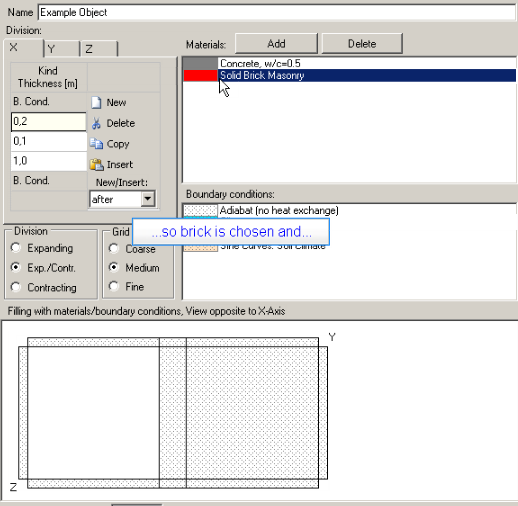
- above is the example interface in the guide movie.
- QQ截图20151111223643.png (46.62 KiB) Viewed 10273 times
above is the example interface in the guide movie.
below is the interface on my screen when defining a 3D-objects.
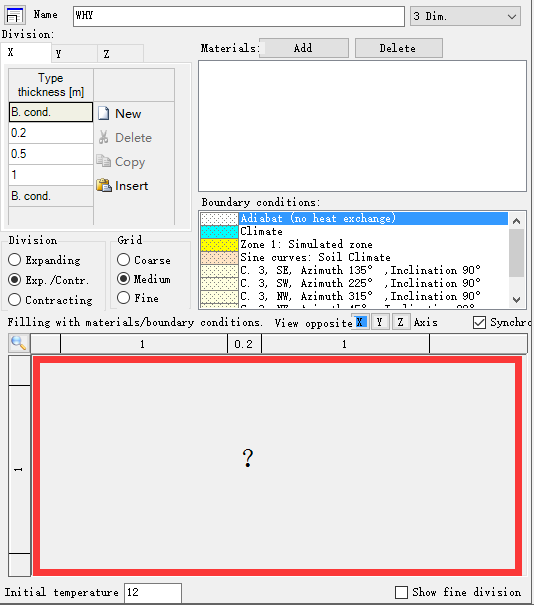
- below is the interface on my screen when defining a 3D-objects.
- QQ截图20151111223410.png (17.91 KiB) Viewed 10273 times
after inputing the thickness divisions in x,y,z, there are on division lines showed up in the blank box. so the material cannot be assigned to specifical region.
how could be such wrong? is there any steps should be carefully handle when doing with 3D objects?
Re: 3D Objecte
Posted: Wed Nov 11, 2015 3:56 am -1100
by MjNJUer
ok ok!!!
I FOUND THE MATTER.
when inputing the thickness, such as 0.5M, the decimal point should be inputed as the comma.
Re: 3D Objecte
Posted: Wed Nov 11, 2015 10:32 pm -1100
by mpazold
ok. normally both, the comma and the dot should be possible...
however, below the 3D-visulalization for the 3d-object, there should be the "Status:"-message for the object givin you the hint, where the error occur.